PlantUML Notes
Table of Contents
1. Local Hosting
1.1. Local Hosting via Apache Tomcat
Original document for hosting via Apache Tomcat Server can be found here
|
-
Install
Apache Tomcatv10+ -
Get the
plantuml.warfile from here -
Place the
plantuml.warfile in thewebappsfolderexample pathC:\Program Files\Apache Software Foundation\Tomcat 10.1\webapps
1.2. Local Hosting via PicoWeb
| The full document can be found here |
-
PicoWebis a tiny webserver that has been integrated into the PlantUML.jarfile.-
Download one of the available
.jarfiles from here -
Start a CMD window
-
Run:
Example commandjava -D java.awt.headless=true -jar plantuml-gplv2-1.2026.1.jar -picoweb:8080 -verbose (1)1 8080 is the default port Example result(0.000 - 34 Mo) 29 Mo - SecurityProfile LEGACY (0.000 - 34 Mo) 28 Mo - PlantUML Version 1.2024.6 (0.000 - 34 Mo) 28 Mo - GraphicsEnvironment.isHeadless() true (0.000 - 34 Mo) 28 Mo - Forcing -Djava.awt.headless=true (0.000 - 34 Mo) 28 Mo - java.awt.headless set as true webPort=8080 -
Configure your app, e.g. VSC, Antora,etc to connect to:
http://localhost:8080/plantuml
-
2. Diagram Types
2.1. Directed Graphs
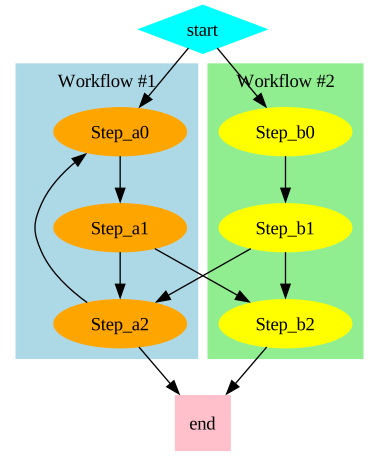
Figure 1. Directed Graph
Expand for source
Source
@startdot
[plantuml,sample-directed-graph,svg]
....
digraph G {

  subgraph cluster_0 {
    style=filled;
    color=lightblue;
    node [style=filled,color=orange];
    Step_a0 -> Step_a1 -> Step_a2;
    label = "Workflow #1";
  }

  subgraph cluster_1 {
    style=filled;
    color=lightgreen;
    node [style=filled,color=yellow];
    Step_b0 -> Step_b1 -> Step_b2;
    label = "Workflow #2";
  }

  start [shape=Mdiamond,style=filled,color=cyan];
  end [shape=Msquare,style=filled,color=pink];

  start -> Step_a0;
  start -> Step_b0;
  Step_a1 -> Step_b2;
  Step_b1 -> Step_a2;
  Step_a2 -> Step_a0;
  Step_a2 -> end;
  Step_b2 -> end;
}
@enddot
....
2.2. Activity Diagram
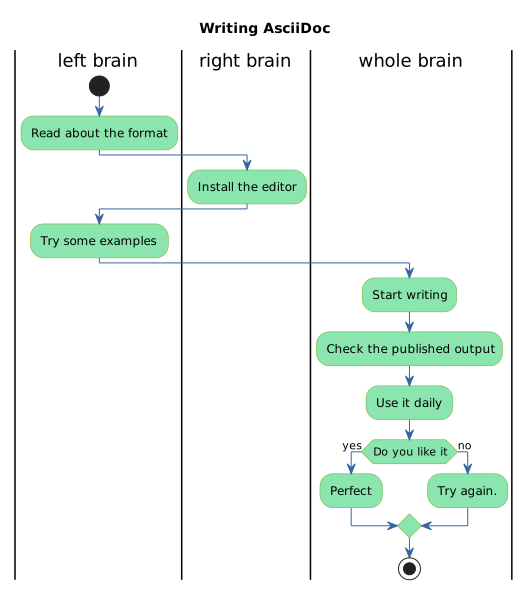
Figure 2. Activity Diagram
Expand for source
Source
[plantuml,sample-activity-diagram,svg]
....
@startuml demo-graph2

title Writing AsciiDoc

skinparam ActivityBackgroundColor #8ae6ae
skinparam ActivityBorderColor #74a82a
skinparam ArrowColor #3565a1
skinparam DefaultFontName Fira Code

|left brain|
start
:Read about the format;
|right brain|
:Install the editor;
|left brain|
:Try some examples;
|whole brain|
:Start writing;
:Check the published output;
:Use it daily;

if (Do you like it) then (yes)
    :Perfect;
else (no)
    :Try again.;
endif

stop
@enduml
2.3. Menu
| Full document here |

Figure 3. Menu
Click to show PlantUML source
Source
[plantuml,sample-menu,svg]
....
@startsalt
{+
    {*
    File | Edit | Source | Refactor                     (1)
    File| New | <b><i>Open File | - | Close | Close All (2)
    }
}
@endsalt
....| 1 | This line defines the top level |
| 2 | This line defines the File menu sub-menu items |

2.5. Tree View
| Full document here |
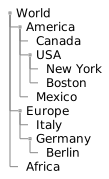
Figure 5. Tree view
Click to show PlantUML source
Source
[plantuml,sample-tree,svg]
....
@startsalt
{
    {T
        + World
        ++ America
        +++ Canada
        +++ USA
        ++++ New York
        ++++ Boston
        +++ Mexico
        ++ Europe
        +++ Italy
        +++ Germany
        ++++ Berlin
        ++ Africa
    }
}
@endsalt
....
3. Inline Styling
3.1. Element Styling
-
You can change the color or style of individual elements using the following notation:
#[color|back:color];line:color;line.[bold|dashed|dotted];text:color
Example[plantuml,sample-element-styling,svg] .... @startuml actor "An Actor" as an_actor #pink;line:red;line.bold;text:red folder "A Folder" as a_folder #aliceblue;line:blue;line.dotted;text:blue { rectangle "Something inside the folder" } @enduml ....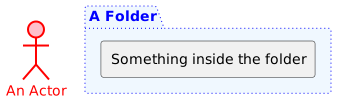 Figure 6. Rendered
3.2. Line Styling
-
You can change the color or style of individual arrows using the inline following notation:
#color;line.[bold|dashed|dotted];text:color
Example@startuml actor foo foo --> (bar) : normal foo --> (bar1) #line:red;line.bold;text:red : red bold foo --> (bar2) #green;line.dashed;text:green : green dashed foo --> (bar3) #blue;line.dotted;text:blue : blue dotted @enduml Figure 7. Rendered Example