MidPoint Install
1. Synopsis
This document describes the installation procedure for installing MidPoint on RHEL/CentOS. Original documentation is here.
2. Installation
2.1. Installation Prerequisites
2.1.1. Install Java
Install the Jave 11 JRE
-
Update
sudo dnf update -y -
Install the Java Open JDK which will include the Java JRE
sudo dnf install java-11-openjdk-devel -y -
Confirm Java Open JDK installation
java --version

openjdk 11.0.13 2021-10-19 LTS
OpenJDK Runtime Environment 18.9 (build 11.0.13+8-LTS)
OpenJDK 64-Bit Server VM 18.9 (build 11.0.13+8-LTS, mixed mode, sharing)
2.2. Install MidPoint via Docker
-
Installing via
Dockereliminates many of the following sections of this document. -
Dockerinstructions can be found here
2.3. Install MidPoint
-
Identify the latest stable
MidPointdistribution package from the Evolveum download page. -
Download the latest version via
curl:curl --remote-name-all https://evolveum.com/downloads/midpoint/4.4/midpoint-4.4-dist.tar.gz -
Extract the file contents into
/opt/:sudo tar -xvf midpoint-4.4-dist.tar.gz --directory /opt/ -
Rename dir:
sudo mv /opt/midpoint-4.4 /opt/midpoint
2.4. Update Firewall
-
Update firewall to allow inbound traffic on port 8080:
sudo firewall-cmd --permanent --zone=public --add-port=8080/tcp

sudo systemctl restart firewalld
2.5. Configure systemd for Start/Stop
-
If midpoint is running, shut it down
sudo /opt/midpoint/bin/stop.sh Stopping midPoint Midpoint stopped. -
Create new file
/etc/systemd/system/midpoint.servicewith the following content:[Unit] Description=MidPoint Standalone Service ###Requires=postgresql.service ###After=postgresql.service [Service] #User=midpoint User=root WorkingDirectory=/opt/midpoint ExecStart=/usr/bin/java -Xmx2048m -Dmidpoint.home=/opt/midpoint/var -jar /opt/midpoint/lib/midpoint.war (1) SuccessExitStatus=143 ###TimeoutStopSec=120s [Install] WantedBy=multi-user.target1 The ExecStart=/usr/bin/java -Xmx2048mentry sets the amount of memory used by Java. Adjust as needed. -
Run the following command to read the new
midpointservice:sudo systemctl daemon-reload -
Run the following command to start the
midpointservice when the host is started:sudo systemctl enable midpoint Created symlink /etc/systemd/system/multi-user.target.wants/midpoint.service → /etc/systemd/system/midpoint.service.
2.6. Start MidPoint
-
Start
midPointas a systemd service using the following command:sudo systemctl start midpointThis will take a few minutes to start up…
-
Confirm
midpointis running:sudo systemctl status midpoint (1) ● midpoint.service - MidPoint Standalone Service (2) Loaded: loaded (/etc/systemd/system/midpoint.service; enabled; vendor preset: disabled) Active: active (running) since Mon 2022-01-17 14:22:32 EST; 3min 9s ago Main PID: 4111 (java) Tasks: 60 (limit: 17229) Memory: 2.2G CGroup: /system.slice/midpoint.service └─4111 /usr/bin/java -Xmx2048m -Dmidpoint.home=/opt/midpoint/var -jar /opt/midpoint/lib/midpoint.war Jan 17 14:22:32 localhost systemd[1]: Started MidPoint Standalone Service. Jan 17 14:22:32 localhost java[4111]: midPoint home: /opt/midpoint/var Jan 17 14:22:32 localhost java[4111]: Using loader path: WEB-INF/classes,WEB-INF/lib,WEB-INF/lib-provided,/opt/midpoint/var/lib Jan 17 14:22:37 localhost java[4111]: ClassPath: /opt/midpoint/lib/midpoint.war Jan 17 14:22:46 localhost java[4111]: midpoint.home = /opt/midpoint/var Jan 17 14:22:46 localhost java[4111]: Loading midPoint configuration from file /opt/midpoint/var/config.xml Jan 17 14:23:29 localhost java[4111]: Warning: Nashorn engine is planned to be removed from a future JDK release1 Type this command 2 This rest of this is output -
Confirm
midpointis listening on port 8080:sudo ss -tulpn | less | grep :8080 tcp LISTEN 0 100 *:8080 *:* users:(("java",pid=12187,fd=52))
2.7. Launch the MidPoint Interface
-
Launch browser:
http://localhost:8080/midpoint/login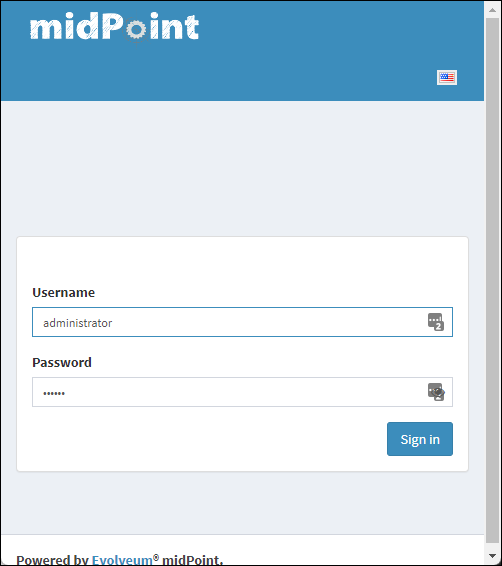
-
Use the following initial set of credentials
This is the default documented password so change it immediately !
Property Value User Name
adminstrator
Password
5ecr3t