Visual Studio Installation

1. Install Visual Studio 2022

  1. Download the bootstrapper from here.

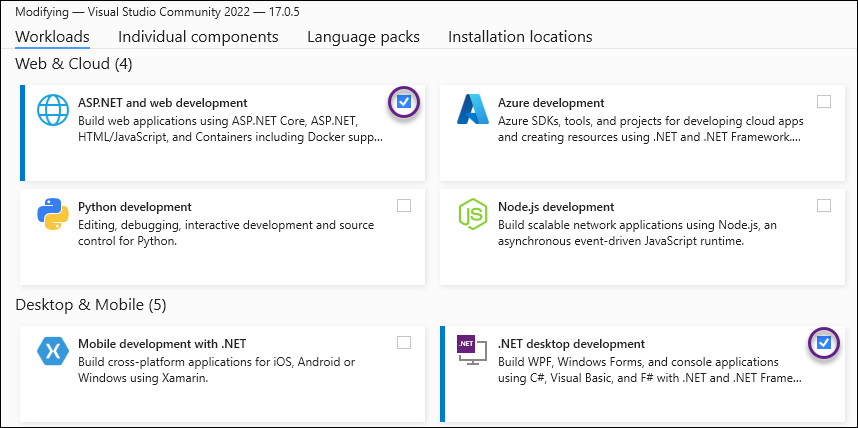
  2. Install with at least the following Workloads enabled:

    VS Workloads

2. Config

2.1. Change the Theme

  • There are a few built in themes but more can be downloaded from here.

  • From Tools  Theme  A theme.

2.2. Disable CodeLens

  • From the Tools  Options.

  • In the left navigation pane select Text Editor  All Languages  CodeLens.

  • Uncheck Enable CodeLens.

2.3. Razor editing

  • In the left navigation pane select Environment  Fonts and Colors.

  • In Show settings for: select Text-Editor.

  • In Display items: window select HTML Razor Code Background.

  • For Item background: click the Custom button.

  • Set Red,Green, and Blue values = 30

2.4. Optimize for C# development environment

  • From Tools  Import and Export Settings.

  • Select the Reset all settings radio button.

  • Select No, just reset settings…​ radio button.

  • Now select Visual C#.