Antora Notes
1. About
Antora is one of a few static site generators which can build a website from asciidoc files sourced from one or more Git repos.
2. Antora Install
Full doc is here
-
Install
Node.js-
Download from here.
-
If VSC windows were opened prior to the install then all of them will need to be closed.
-
-
Initialize
package.jsonfile-
CD to
C:\Users\mattosd\source\repos\GitLab\repo-tech-docs2 -
Run
node -e "fs.writeFileSync('package.json', '{}')"npm i -D -E antora
-
3. Asciidoctor
Asciidoctor is the core AsciiDoc processor. It reads the AsciiDoc source, parses it into a document model, and converts it to a publishable format such as HTML using a converter. Asciidoctor has both a CLI and an API that you can use to invoke a built-in converter (HTML, DocBook, man page) or an add-on converter. Asciidoctor enriches the HTML it produces from AsciiDoc by applying a default stylesheet, adding stylistic icons, and syntax highlighting source blocks.
3.1. Asciidoctor.js
|
Don’t know how to create PDF file with this method. |
-
Details are here
-
Install
asciidoctor.jsnpm i asciidoctor -
Confirm
asciidoctor.jsis installednpm -x asciidoctor --version -
Install the
asciidoctor.jsCLInpm i -g asciidoctor -
Confirm
asciidoctor.jsCLI is installedasciidoctor --version -
Place holder for a missing node.js package
-
Convert file to
pdfasciidoctor -b [path to .adoc file]
3.2. Asciidoctor to PDF
|
|
-
Install
asciidoctor-pdfnpm i asciidoctor-pdf -
Install the
asciidoctor-pdfCLInpm i -g asciidoctor-pdf -
Convert file to
pdfasciidoctor-pdf -a icons=font -a iconset=fas [path to .adoc file]
3.3. Asciidoctor Web to PDF
-
Details are here
-
Start a CLI window
-
Install asciidoctor-kroki
npm i asciidoctor-kroki -
Install
yargs-parsernpm i yargs-parser -
Install
asciidoctor-pdfnpm i @asciidoctor/core asciidoctor-pdf --save-dev -
Confirm installation
npx asciidoctor-web-pdf --version -
Generate a PDF file
npm x asciidoctor-web-pdf README.adocDoesn’t worknpm x asciidoctor-web-pdf --require asciidoctor-kroki README.adoc
4. Antora Extensions
4.1. Lunr Extension
Allows for text search. See more details here.
-
Install
npm install @antora/lunr-extension -
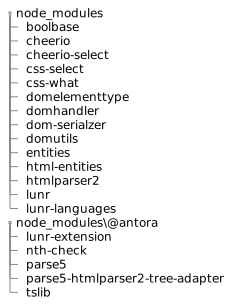
After the install, new folders will be added
Expand for tree view
-
Add the following to the
playbook.ymlfile:antora: extensions: - '@antora/lunr-extension'
4.2. Kroki
4.2.1. Install the Kroki Extension:
-
Via npm, install the
asciidoctor-krokiextension:npm install asciidoctor-kroki -
Add the following to the
playbook.ymlfile:An external site does the actual rendering
asciidoc:
  attributes:
    #kroki-server-url: https://kroki.io
    kroki-server-url: "https://kroki.xackleystudio.com/kroki"
    kroki-fetch-diagram: true
  extensions:
  - asciidoctor-kroki
4.3. PlantUML
PlantUML documentation can be found here.
Documentation for integration with Antora can be found here.
4.3.1. Install the PlantUML Extension:
-
Via npm, install the
asciidoctor-plantumlextension:npm install asciidoctor-plantuml -
After the install, new folders will be added to the
node_modulesfolder:-
asciidoctor-plantuml
-
mkdirp
-
plantuml-encoder
-
rusha
-
-
Add the following to the
playbook.ymlfile:An external site does the actual rendering
asciidoc:
  attributes:
    #plantuml-server-url: "https://plantuml.gitlab-static.net"
    plantuml-server-url: "https://plantuml.xackleystudio.com/plantuml"
    plantuml-fetch-diagram: true
  extensions:
  - asciidoctor-plantuml
4.3.2. Enable Visual Studio Code preview
-
In the VSC
AsciiDocextension, set the following config values:Config Value Enable Kroki
true
-
If the
PlantUMLextension is installed set the following config values:Config Value Plantuml: Render
PlantUMLServer
Plantuml: Server
Select one of the following:-
https://plantuml.gitlab-static.net
Ideally a privately hosted server would be preferred.
-
Now place
PlantUMLcode in your document via one of these two methods:InlinePlantUMLcode:[plantuml,sample-puml,svg] .... @startuml !theme materia-outline frame "Group 1" as g1 #Yellow { } package "Group 2" as g2 #LightBlue { } g1--->g2 #Blue g2--->g1 #Red @enduml ....Or include from a separate source file:[plantuml,sample-puml,svg] .... include::../partials/sample-puml.puml[] .... -
The rendered
PlantUMLcode:Example 1. RenderedPlantUMLcode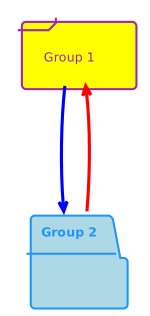
5. Antora Publish
5.1. Build the Site
-
Download this repo.
-
Edit the
output:dirkey specified in thesite-playbook.ymlyaml file. This should point to the physical path of your website.Exampleoutput: clean: false dir: \\p-ubuntu-norco\repo-docker-master\stack-websites\TechDocs\html-data -
To build the AsciiDoc pages of this REPO into a static website via Antora, open a terminal window and run the following:
Run from the root of the project. npx antora --fetch site-playbook --stacktrace -
If you see this:
npx : File C:\Program Files\nodejs\npx.ps1 cannot be loaded because running scripts is disabled on this system. For more information, see about_Execution_Policies at https:/go.microsoft.com/fwlink/?LinkID=135170.-
Launch PowerShell as Administrator.
-
Run this
Set-ExecutionPolicy RemoteSigned -Scope CurrentUser
-
This will create a build\site folder in this repo.
5.2. Preview the Site
-
Go to the directory specified in
output:dirkey of thesite-playbook.ymlyaml file. -
Open the
..\Xackley-Tech-Docs\1.0\index.htmlfile in a web browser.
This should launch the site and allow for previewing before publishing to IIS for the purpose of hosting the static website.
5.3. Supplemental UI
Instructions are here