Open LDAP Notes
3. Create Structure
-
Use the
phpldapadminGUI for the following steps
3.1. Create OUs
-
Click on the
dc=xackleystudio,dc=locallink. -
Click Create a child entry to create a new
Organizational Unit. -
Select Generic: Organisational Unit radio button.
-
Provide the name as groups and click Create Object followed by Commit
-
Now repeat and OU named users.
-
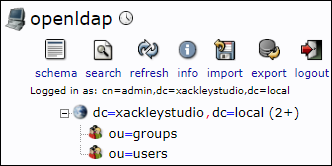
This is the completed set of OUs:
3.2. Create Groups
-
Click on the link.
-
Click Create a child entry to create a new
Group. -
Select the Generic: Posix Group radio button.
-
Provide the name as employee and click Create Object followed by Commit
-
Repeat these steps to create any additional groups.
3.3. Create Users
-
Click on the link.
-
Click Create a child entry to create a new
User. -
Select the Generic: User Account radio button.
-
Complete the fields.
-
For the GID Number, select a group e.g., employee
-
For the Login shell, select a shell e.g., bash
-
-
Click Create Object followed by Commit and Update Object
-
Repeat these steps to create any additional users.
-
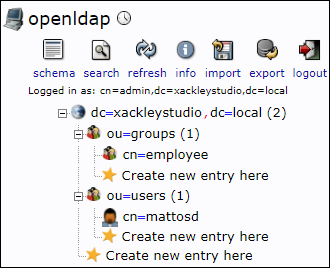
This is the completed config: