XS Blazor UI Components - Consumers Guide - .Net 9
1. Synopsis
-
This document is intended for end-user developers who will write code to consume the
XS.Lib.Blazor.UIComponentslibrary in a.Net 9.xProject.
3. Parent Project Setup
This is the setup for the project that consumes the Com.xx.Lib.UI.Blazor (XS.Lib.Blazor.UIComponents) component library.
|
3.1. Create new VS Project 9.x
-
Create a new project using the Blazor Web App template.
Setting Value Framework
.NET 9.x (Standard Term Support)Authentication type
None
Configure for HTTPS
True
Interactive render mode
ServerInteractivity location
Global
3.2. Install the XS NuGet Package
-
The
XS.Lib.Blazor.UIComponentsNuGet package is hosted at the remote MyGet central package repository. -
In order to use the
XS.Lib.Blazor.UIComponentsNuGet packageVisual Studioneeds to be configured to retrive packages from MyGet. -
After the MyGet source has been configured, the package can then be accessed and downloaded.
3.2.1. Add XS MyGet Package Source
| This step only needs to be done once at the creation of your project. |
-
Right mouse click on the project file and launch
Manage NuGet Package Explorer: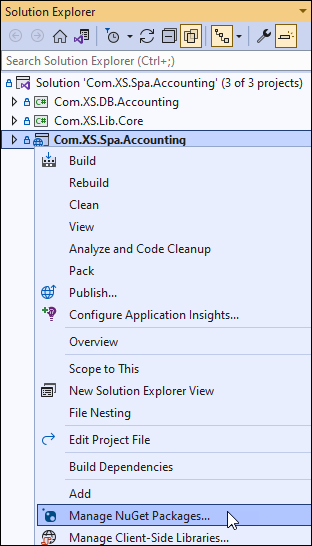
-
Click the Settings button as shown:
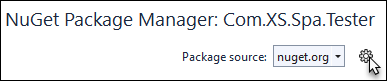
-
Click the + button to add a new package source:
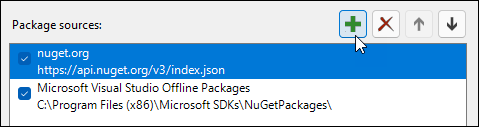
-
Overwrite the initial text with the
MyGetpackage source details:Initial package source text
-
Name:
XS NuGet Packages -
Source:
https://www.myget.org/F/xs/api/v3/index.jsonUpdated with MyGet Package Source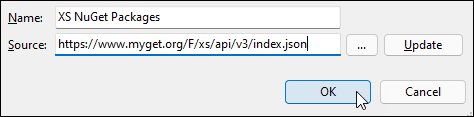
-
Click the OK button to add the new
package source.
-
-
Clicking the Settings button again will show the newly created
package source.New MyGet Package Source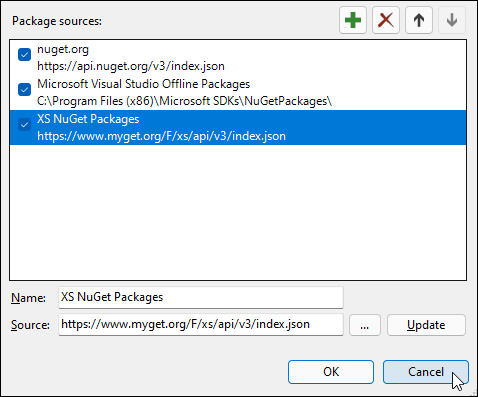
-
Click the Cancel button to exit the package manager settings.
3.2.2. Install the XS.Lib.Blazor.UIComponents NuGet Package
There are two ways to install the package:
-
Method 1: Via the
Package Manager Consolecmdline:-
Launch via
-
Confirm the
Default project:is set to the project where the package should be installed.Example Default Project
-
Now execute:
Install-Package XS.Lib.Blazor.UIComponents -Version 0.0.1-rc.9 -Source https://www.myget.org/F/xs/api/v3/index.json (1)1 The value for the -Versionparameter should match an existing version.
-
-
Method 2: Via Gui
TBD -
Now the NuGet package is installed.
Click to show image…
NuGet Package is Installed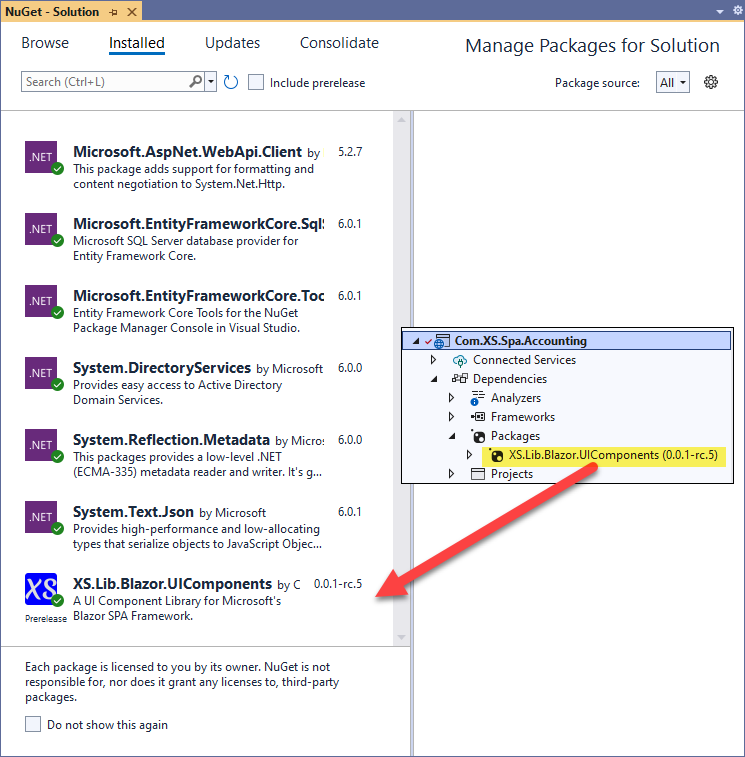
3.2.3. Updating the XS.Lib.Blazor.UIComponents NuGet Package Version
-
To keep up to date with the latest enhancements and bug fixes the package can be updated on demand.
-
When new versions are released, start the update via:
-
Right mouse click on the project and select Manage NuGet Packages…
-
Change the
Package source:to XS NuGet Packages.
-
-
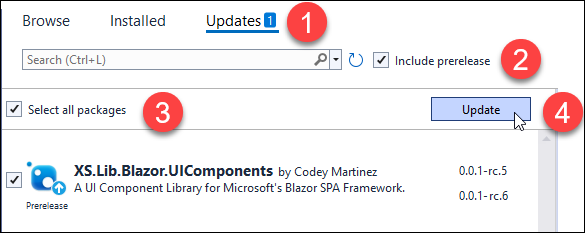
Now update the package via the following steps:
-
Click on
Updatestab. -
Optionally check the
Include prereleasecheckbox. -
Check the
Select all packagescheckbox. -
Click the Update button which will in this example upgrade the NuGet package version from 0.0.1-rc.5 to 0.0.1-rc.6.
-

3.3. Custom UI Component Library Integration
-
Add the following to the parent project’s
Components\_Imports.razorfile:@* For Authorization *@ @using Microsoft.AspNetCore.Components.Authorization @* For the XS.Lib.Blazor.UIComponents Components Library*@ @using Com.XS.Lib.UI.Blazor @using Com.XS.Lib.UI.Blazor.XS_Components -
Remove unnecessary style sheets, folders, favicon, and any other files.
-
in the
wwwrootfolder remove unnecessary style sheets e.g.:lib app.cs favicon.png -
Replace
Components\App.razorfile:Expand for
Components\App.razorsource<!DOCTYPE html> <!--Set initial theme--> <html lang="en" class=""> <head> <title>My Awesome Web App</title> <meta charset="utf-8" /> <meta name="viewport" content="width=device-width, initial-scale=1.0" /> <base href="/" /> <!--Start of End User CSS--> <link rel="stylesheet" href="@Assets["css/StyleSheet.css"]" type="text/css" /> <!--Finished End of User CSS--> <!-- Custom XS UI Components CSS --> <link rel="stylesheet" href="@Assets["_content/XS.Lib.Blazor.UIComponents/css/XS_Components.min.css"]" type="text/css" /> <!-- End Custom XS UI Components CSS --> <ImportMap /> <!--For PWA support--> <meta name="theme-color" content="#7F7F7F" /> <link rel="apple-touch-icon" href="/apple-touch-icon.png" crossorigin="use-credentials" /> <link rel="icon" type="image/png" sizes="32x32" href="/favicon-32x32.png"> <link rel="icon" type="image/png" sizes="16x16" href="/favicon-16x16.png"> <link rel="manifest" href="/site.webmanifest" crossorigin="use-credentials" /> <!--End PWA support--> <HeadOutlet @rendermode="InteractiveServer"/> </head> <body> <Routes @rendermode="InteractiveServer" /> <script src="_framework/blazor.web.js"></script> <!-- Custom XS UI Components JavaScript --> <script src="_content/XS.Lib.Blazor.UIComponents/js/XS_Components.js"></script> <!-- End Custom XS UI Components JavaScript --> <!-- For PWA support --> <script>navigator.serviceWorker.register('service-worker.js');</script> <!-- End PWA support --> </body> </html>
-
3.4. Add Progressive Web Application (PWA) Support
|
3.4.1. Create Favicons
-
Use the Favicon IO Generator to create the favicons.
-
Use the following as a guide:
Property Value Font Family
Merienda 1
Font Size
100
Font Color
#DDD
Background Color
#00F
-
-
After creating the favicons, download them as a
.zipfile. -
Extract all files and add them into the
wwwrootfolder.
3.4.2. Create an Offline Page
-
In the project’s
wwwrootfolder create anoffline.htmlpage. Complete this page with content that is relevant to your site. This page will be displayed when your site is offline.<!DOCTYPE html> <html> <head> <meta charset="utf-8" /> <title>Site is offline</title> </head> <body> </body> </html>
3.4.3. Create a Manifest File
-
In the project’s
wwwrootfolder edit thesite.webmanifestfile with the following content.Expand for site.webmanifest source
{
    //https://web.dev/window-controls-overlay/
    //https://learn.microsoft.com/en-us/microsoft-edge/progressive-web-apps-chromium/how-to/window-controls-overlay
    //https://www.youtube.com/watch?v=NvClp35dFVI
    "name": "My App v2.1",                         (1)
    "short_name": "My App",                        (2)
    "description": "My Progressive Web App (PWA)", (3)
    "start_url": "./",
    "display": "standalone",
    "display_override": [ "window-controls-overlay" ],
    "orientation": "any",
    "scope": "./",
    "background_color": "#fff",
    "theme_color": "#fff",
    "icons": [
        {
            "src": "apple-touch-icon.png",
            "type": "image/png",
            "sizes": "180x180"
        },
        {
            "src": "android-chrome-192x192.png",
            "type": "image/png",
            "sizes": "192x192"
        },
        {
            "src": "android-chrome-512x512.png",
            "type": "image/png",
            "sizes": "512x512"
        },
        {
            "src": "path/to/maskable_icon.png", (4)
            "sizes": "196x196",
            "type": "image/png",
            "purpose": "any maskable"
        }
    ]
}
1 Update this. 2 Update this but must be under 12 characters. 3 Update this. 4 Update this.
3.4.4. Create a Service Worker JavaScript file
-
In the project’s
wwwrootfolder create aservice-worker.jsfile with the following content:// In development, always fetch from the network and do not enable offline support. // This is because caching would make development more difficult (changes would not // be reflected on the first load after each change). self.addEventListener('fetch', () => { }); -
In the project’s
wwwrootfolder create aservice-worker.published.jsfile with the following content:Expand for service-worker.published.js source
// Caution! Be sure you understand the caveats before publishing an application with
// offline support. See https://aka.ms/blazor-offline-considerations

self.importScripts('./service-worker-assets.js');
self.addEventListener('install', event => event.waitUntil(onInstall(event)));
self.addEventListener('activate', event => event.waitUntil(onActivate(event)));
self.addEventListener('fetch', event => event.respondWith(onFetch(event)));

const cacheNamePrefix = 'offline-cache-';
const cacheName = `${cacheNamePrefix}${self.assetsManifest.version}`;
const offlineAssetsInclude = [/\.dll$/, /\.pdb$/, /\.wasm/, /\.html/, /\.js$/, /\.json$/, /\.css$/, /\.woff$/, /\.png$/, /\.jpe?g$/, /\.gif$/, /\.ico$/, /\.blat$/, /\.dat$/];
const offlineAssetsExclude = [/^service-worker\.js$/];

async function onInstall(event) {
    console.info('Service worker: Install');

    // Fetch and cache all matching items from the assets manifest
    const assetsRequests = self.assetsManifest.assets
        .filter(asset => offlineAssetsInclude.some(pattern => pattern.test(asset.url)))
        .filter(asset => !offlineAssetsExclude.some(pattern => pattern.test(asset.url)))
        .map(asset => new Request(asset.url, { integrity: asset.hash }));
    await caches.open(cacheName).then(cache => cache.addAll(assetsRequests.map(url => new Request(url, { credentials: 'same-origin' }))));
}

async function onActivate(event) {
    console.info('Service worker: Activate');

    // Delete unused caches
    const cacheKeys = await caches.keys();
    await Promise.all(cacheKeys
        .filter(key => key.startsWith(cacheNamePrefix) && key !== cacheName)
        .map(key => caches.delete(key)));
}

async function onFetch(event) {
    let cachedResponse = null;
    if (event.request.method === 'GET') {
        // For all navigation requests, try to serve index.html from cache
        // If you need some URLs to be server-rendered, edit the following check to exclude those URLs
        const shouldServeIndexHtml = event.request.mode === 'navigate';

        const request = shouldServeIndexHtml ? 'index.html' : event.request;
        const cache = await caches.open(cacheName);
        cachedResponse = await cache.match(request);
    }

    return cachedResponse || fetch(event.request);
}
3.5. Logs Directory
3.5.1. Publishing
-
Log files directory.
-
Create a
logsfolder in the root of the project. -
If the log files folder is empty, it will not be published to the target server. To remedy this:
-
Create a
.gitkeepfile in this folder. Note that this is not an actual git command - it simply places a file in the folder which keeps it from being empty. -
Right click on this file and choose
Properties -
In the
Propertieswindow, change theCopy to Output Directoryproperty toCopy if Newer.
-
-
3.5.2. Git
-
Log files
-
While debugging on the desktop the
logsfolder will fill up with log files and you don’t want to have to delete them each time prior to committing the repo to git. -
If you add the following two entries to the repo’s (this is not your project’s folder)
.gitignorefile those log files will not be part of git commits:# Exclude Log files *_out.xml *_err.xml
-
3.6. Update Configuration
-
Edit the
program.csfile:-
Find the line that contains
app.UserAntiforgery(); -
Add this code above that line:
app.UseStatusCodePagesWithReExecute("/Error");
-
3.7. Create Test Pages
3.7.1. Routes.razor
Not for MAUI
|
-
Edit the
Components\Routes.razorfile for non-MAUIweb apps:Expand for
Components\Routes.razorsource<CascadingAuthenticationState> <Router AppAssembly="typeof(Program).Assembly"> <Found Context="routeData"> <AuthorizeRouteView RouteData="@routeData" DefaultLayout="@typeof(Layout.MainLayout)"> <NotAuthorized> <p>Sorry, you're not authorized to reach this page.</p> <p>You may need to log in as a different user.</p> </NotAuthorized> </AuthorizeRouteView> </Found> <NotFound> <LayoutView Layout="@typeof(Layout.MainLayout)"> <XS_Error404/> </LayoutView> </NotFound> </Router> </CascadingAuthenticationState>
3.7.2. MainLayout.razor
-
Edit the
Components\Layout\MainLayout.razorfileExpand for
Components\Layout\MainLayout.razorsource@inherits LayoutComponentBase <NavMenu /> <XS_MainLayout> <XS_ContainerFluidRow> <XS_ContainerFluidColumn> @Body </XS_ContainerFluidColumn> </XS_ContainerFluidRow> <XS_ContainerFluidRow> <XS_ContainerFluidColumn> <XS_Break /> <XS_Divider /> </XS_ContainerFluidColumn> </XS_ContainerFluidRow> <XS_ContainerFluidRow> <XS_ContainerFluidColumn> <Footer /> </XS_ContainerFluidColumn> </XS_ContainerFluidRow> <XS_ContainerFluidRow> <XS_ContainerFluidColumn> <XS_Break /> </XS_ContainerFluidColumn> </XS_ContainerFluidRow> </XS_MainLayout> <div id="blazor-error-ui"> <environment include="Staging,Production"> An error has occurred. This application may no longer respond until reloaded. </environment> <environment include="Development"> An unhandled exception has occurred. See browser dev tools for details. </environment> <a href="" class="reload">Reload</a> <a class="dismiss">🗙</a> </div>
3.7.3. LoginDisplay.razor
-
Create the
Components\Layout\LoginDisplay.razorfile:Expand for
Components\Layout\LoginDisplay.razorsource<!--When testing locally, on this project's properties, go to Debug-> Web Server Settings. make sure 'Anonymous Authentication' is disabled and 'Windows Authentication' is enabled--> <!--On the remote IIS, under Authentication, make sure 'Anonymous Authentication' is disabled and 'Windows Authentication' is enabled--> <AuthorizeView> <Authorized> <XS_AuthorizedView_Authorized> <XS_DropdownButton Label="" IconName=XS_IconName_SVG.user_check_SVGRepo Color="XS_CSS_Color.Success"> <XS_Link IconName="XS_IconName_SVG.logout_2_SVGRepo" IconColor="XS_CSS_Color.Danger" Url="MicrosoftIdentity/Account/SignOut">Log out</XS_Link> </XS_DropdownButton> @context?.User?.Identity?.Name </XS_AuthorizedView_Authorized> </Authorized> <NotAuthorized> <XS_AuthorizedView_NotAuthorized> <XS_DropdownButton Label="" IconName=XS_IconName_SVG.user_block_SVGRepo Color="XS_CSS_Color.Danger"> <XS_Link IconName="XS_IconName_SVG.login_2_SVGRepo" Url="MicrosoftIdentity/Account/SignIn">Log In</XS_Link> </XS_DropdownButton> Logged out. </XS_AuthorizedView_NotAuthorized> </NotAuthorized> </AuthorizeView>
3.7.4. Footer.razor
-
Create
Components\Layout\Footer.razorfile:Expand for
Components\Layout\Footer.razorsource@page "/Footer" <XS_Panel> <XS_Panel_Body> <ul> <li>We welcome your feedback.</li> <li>If you are in need of technical support, please contact the <XS_MailTo Address="martinezc@xackleystudio.com">XS</XS_MailTo> support team</li> (1) </ul> </XS_Panel_Body> </XS_Panel> @{ }1 Update with applicable contact info.
3.7.5. Home.razor
-
Edit the
Components\Pages\Home.razorfile:Expand for
Components\Pages\Home.razorsource@page "/" @using Com.XS.Lib.Core @inject IJSRuntime JS; <XS_PageTitle><strong>Home</strong></XS_PageTitle> <XS_Alert @ref="MyAlert" ThePageContent="@MyPageContent" /> <XS_Modal @ref="MyModal" RefID="Modal_Test" BodyHTML="@MyModalBodyHTML" ShowCloseButton="true" VerticalAlignment=@MyModalPos Height="260" Width="450"> <XS_Modal_Header> <XS_Header Size="XS_CSS_HeaderSize.H4">@((MarkupString)MyModalHeaderText)</XS_Header> </XS_Modal_Header> <XS_Modal_Body>@MyModalBodyText</XS_Modal_Body> <XS_Modal_Footer>Bottom Footer</XS_Modal_Footer> </XS_Modal> <XS_Modal @ref="MyIcon_Modal" RefID="Icon_Modal" BodyHTML="@MyModalBodyHTML" ShowCloseButton="true" Height="230" Width="416"> <XS_Modal_Header> <XS_Header Size="XS_CSS_HeaderSize.H4">@MyIconModal_HeaderText</XS_Header> </XS_Modal_Header> <XS_Modal_Body> <XS_IconSVG IconName="@MyIconModal_Body" IconSize="92" Color="XS_CSS_Color.Primary" /> </XS_Modal_Body> </XS_Modal> <XS_Page_Content @ref="MyPageContent"> <XS_TabHorizontal> <XS_TabList> <XS_Tab Label="Entra ID" IconName="XS_IconName_SVG.AzureLogo_FluentUI"> <XS_Panel Panel_Body_Content_Center="false"> <XS_Panel_Header>Roles for @UserName</XS_Panel_Header> <XS_Panel_Body> <ul> @if (HasAdminRole) { <li><XS_IconSVG IconSize="30" IconName="XS_IconName_SVG.thumb_up_black_24dp_GoogleIcon" Color="XS_CSS_Color.Success" MarginRight="XS_CSS_SpacingSize.X2"></XS_IconSVG>Has Admin Role</li> } else { <li><XS_IconSVG IconSize="30" IconName="XS_IconName_SVG.sad_circle_SVGRepo" Color="XS_CSS_Color.Danger" MarginRight="XS_CSS_SpacingSize.X2"></XS_IconSVG>Does not have Admin Role</li> } <li></li> @if (HasReadOnlyRole) { <li><XS_IconSVG IconSize="30" IconName="XS_IconName_SVG.thumb_up_black_24dp_GoogleIcon" Color="XS_CSS_Color.Success" MarginRight="XS_CSS_SpacingSize.X2"></XS_IconSVG>Has Read-only Role</li> } else { <li><XS_IconSVG IconSize="30" IconName="XS_IconName_SVG.sad_circle_SVGRepo" Color="XS_CSS_Color.Danger" MarginRight="XS_CSS_SpacingSize.X2"></XS_IconSVG>Does not have Read-only Role</li> } </ul> </XS_Panel_Body> <XS_Panel_Footer>@PreferredUserName</XS_Panel_Footer> </XS_Panel> </XS_Tab> <XS_Tab Label="SVG Icons" IconName="XS_IconName_SVG.images_Bootstrap"> <div style="display:inline-flex;flex-wrap:wrap;flex-direction:row;justify-content:center;overflow:auto;resize:vertical;height:500px;"> @foreach (XS_IconName_SVG anIcon in Enum.GetValues(typeof(XS_IconName_SVG))) { <XS_Panel IsPlain="false" MarginAll="XS_CSS_SpacingSize.X3" Width="315" Panel_Header_Content_Center="true" Panel_Body_Content_Center="true"> <XS_Panel_Header> @anIcon.ToString() </XS_Panel_Header> <XS_Panel_Body> <XS_IconSVG IconName="anIcon" Color="XS_CSS_Color.Primary" IconSize="24" OnClick="@(() => ClickSVGIcon(anIcon))" /> </XS_Panel_Body> </XS_Panel> } </div> </XS_Tab> <XS_Tab Label="Icon Browser" IconName="XS_IconName_SVG.images_Bootstrap"> <XS_IconBrowser></XS_IconBrowser> </XS_Tab> <XS_Tab Label="Text Boxes" IconName="XS_IconName_SVG.Stack_FluentUI"> </XS_Tab> <XS_Tab Label="Tooltips" IconName="XS_IconName_SVG.info_circle_duo_tone_SVGRepo"> <div style="display:block;margin:0 auto;padding:10px;"> <XS_Label> Tooltip positioned Above <XS_TooltipIcon Orientation="XS_IconInfo_Orientation.Top">Tooltip positioned <strong><em>Above</em></strong> the icon</XS_TooltipIcon> </XS_Label> <br /> <br /> <XS_Label> Tooltip positioned Below <XS_TooltipIcon Orientation="XS_IconInfo_Orientation.Bottom">Tooltip positioned <em><strong>Below</strong></em> the icon</XS_TooltipIcon> </XS_Label> <br /> <br /> <XS_Label> <XS_TooltipIcon Orientation="XS_IconInfo_Orientation.Left">Tooltip positioned to the <em><strong>Left</strong></em> of the icon</XS_TooltipIcon> Tooltip positioned the Left </XS_Label> <br /> <br /> <XS_Label> Tooltip positioned the Right @* <XS_TooltipIcon Orientation="XS_IconInfo_Orientation.Right" Width="400">Tooltip positioned to the <em>Right</em> of the icon</XS_TooltipIcon> *@ <XS_TooltipIcon Orientation="XS_IconInfo_Orientation.Right" WidthToolTip="400"> <XS_Panel> <XS_Panel_Header><XS_Header Size="XS_CSS_HeaderSize.H4">Nested Panel</XS_Header></XS_Panel_Header> <XS_Panel_Body>Tooltip positioned to the <em><strong>Right</strong></em> as a nested panel</XS_Panel_Body> </XS_Panel> </XS_TooltipIcon> </XS_Label> </div> </XS_Tab> <XS_Tab Label="ProgressBar" IsDefault="false" IconName="XS_IconName_SVG.ProgressRingDots_FluentUI"> <div style="display:block;padding:10px;"> <XS_Pill Color="XS_CSS_Color.Info" HelpText="Progress Bar Countdown">@pill_progressTest_text</XS_Pill> <br /> <XS_ProgressBar @ref="progressBar_main" Max="5" Value=@progress_value HelpText="Progress Bar Test"></XS_ProgressBar> <br /> <XS_Button Color="XS_CSS_Color.Info" ButtonText="Set to 0%" OnClick="@(async () => { await SetProgress(0); })" HelpText="Click to set to 0" /> <XS_Button Color="XS_CSS_Color.Info" ButtonText="Set to 20%" OnClick="@(async () => { await SetProgress(1); })" /> <XS_Button Color="XS_CSS_Color.Info" ButtonText="Set to 40%" OnClick="@(async () => { await SetProgress(2); })" /> <XS_Button Color="XS_CSS_Color.Info" ButtonText="Set to 60%" OnClick="@(async () => { await SetProgress(3); })" /> <XS_Button Color="XS_CSS_Color.Info" ButtonText="Set to 80%" OnClick="@(async () => { await SetProgress(4); })" /> <XS_Button Color="XS_CSS_Color.Info" ButtonText="Set to 100%" OnClick="@(async () => { await SetProgress(5); })" /> <XS_Button Color="XS_CSS_Color.Info" IconName="XS_IconName_SVG.hourglass_Bootstrap" ButtonText="Run" IsBusy=@_startTimer_isDisabled IsDisabled=@_startTimer_isDisabled OnClick="@StartProgressTimer" HelpText="Click to simulate progress..."></XS_Button> </div> </XS_Tab> <XS_Tab Label="Modals" IsDefault="true" IconName=XS_IconName_SVG.window_frame_SVGRepo HelpText="Test different types of Modal windows"> <XS_Button ButtonType=XS_ButtonType.button ButtonText="Modal at Top" IconName=XS_IconName_SVG.web_asset_black_24dp_GoogleIcon IsBusy="@_IsBusy" IsDisabled="@_IsBusy" OnClick="@(() => ShowModal(XS_CSS_VerticalAlignment.Top))" Color="XS_CSS_Color.Info" MarginAll=XS_CSS_SpacingSize.X2><XS_TooltipIcon MarginLeft="XS_CSS_SpacingSize.X2">Open a Modal window at the top of the browser</XS_TooltipIcon></XS_Button> <XS_Button ButtonType=XS_ButtonType.button ButtonText="Modal at Middle" IconName=XS_IconName_SVG.web_asset_black_24dp_GoogleIcon IsBusy="@_IsBusy" IsDisabled="@_IsBusy" OnClick="@(() => ShowModal(XS_CSS_VerticalAlignment.Middle))" Color="XS_CSS_Color.Info" MarginAll=XS_CSS_SpacingSize.X2><XS_TooltipIcon MarginLeft="XS_CSS_SpacingSize.X2" Orientation="XS_IconInfo_Orientation.Bottom">Open a Modal window in the middle of the browser</XS_TooltipIcon></XS_Button> <XS_Button ButtonType=XS_ButtonType.button ButtonText="Reset" IsDisabled="@(!@_IsBusy)" OnClick="@(() => { _IsBusy = false; })" Color="XS_CSS_Color.Info" MarginAll=XS_CSS_SpacingSize.X2 IconName=XS_IconName_SVG.refresh_black_24dp_GoogleIcon><XS_TooltipIcon MarginLeft="XS_CSS_SpacingSize.X2" Orientation="XS_IconInfo_Orientation.Right">Reset the Modal Window Buttons</XS_TooltipIcon></XS_Button> </XS_Tab> <XS_Tab Label="Alerts" IsDefault="false" IconName="XS_IconName_SVG.Important_FluentUI"> <XS_Button Color=XS_CSS_Color.Primary ButtonText="Show Primary" ButtonType=XS_ButtonType.button IconName=XS_IconName_SVG.question_circle_SVGRepo MarginAll=XS_CSS_SpacingSize.X2 OnClick="@(async () => { await MyAlert.Show(new XS_AlertItemProperties {MessageBody = $"This is a <strong>Primary</strong> messsage <br/> {DateTime.Now}", Color = XS_CSS_Color.Primary, MinHeight = 50}); })" /> <XS_Button Color=XS_CSS_Color.Secondary ButtonText="Show Secondary" ButtonType=XS_ButtonType.button IconName=XS_IconName_SVG.question_circle_SVGRepo MarginAll=XS_CSS_SpacingSize.X2 OnClick="@(async () => { await MyAlert.Show(new XS_AlertItemProperties {MessageBody = $"This is a <strong>Secondary</strong> message <br/> {DateTime.Now}", Color = XS_CSS_Color.Secondary, MinHeight = 50}); })"></XS_Button> <XS_Button Color=XS_CSS_Color.Info ButtonText="Show Info" ButtonType=XS_ButtonType.button IconName=XS_IconName_SVG.info_circle_duo_tone_2_SVGRepo MarginAll=XS_CSS_SpacingSize.X2 OnClick="@(async () => { await MyAlert.Show(new XS_AlertItemProperties {MessageHeader="<h4>This is <strong>Informational!</stong></h4>",MessageBody = $"<strong>Info</strong> message at {DateTime.Now}", Color = XS_CSS_Color.Info, MinHeight = 50}); })" /> <XS_Button Color=XS_CSS_Color.Success ButtonText="Show Success" ButtonType=XS_ButtonType.button IconName=XS_IconName_SVG.thumb_up_black_24dp_GoogleIcon MarginAll=XS_CSS_SpacingSize.X2 OnClick="@(async () => { await MyAlert.Show(new XS_AlertItemProperties {MessageHeader="<h4>This is a <strong>Success!</strong> </h4>",MessageBody = $"<strong>Success</strong> message at {DateTime.Now}", Color = XS_CSS_Color.Success, MinHeight = 50}); })" /> <XS_Button Color=XS_CSS_Color.Warning ButtonText="Show Warning" ButtonType=XS_ButtonType.button IconName=XS_IconName_SVG.warning_2_SVGRepo MarginAll=XS_CSS_SpacingSize.X2 OnClick="@(async () => { await MyAlert.Show(new XS_AlertItemProperties {MessageHeader="<h4>This is a <strong><em>Warning!</em></strong></h4>",MessageBody = $"<strong>Warning</strong> at {DateTime.Now}</h4>", Color = XS_CSS_Color.Warning, MinHeight = 50, BlurPage = true}); })" /> <XS_Button Color=XS_CSS_Color.Danger ButtonText="Show Danger" ButtonType=XS_ButtonType.button IconName=XS_IconName_SVG.danger_triangle_SVGRepo MarginAll=XS_CSS_SpacingSize.X2 OnClick="@(async () => { await MyAlert.Show(new XS_AlertItemProperties {MessageHeader="<h2>This is really <strong><em>Dangerous!</em></strong></h2>",MessageBody = $"<strong>Oh no!!</strong> at {DateTime.Now}", Color = XS_CSS_Color.Danger, MinHeight = 50, BlurPage = true, DimPage = true, BlockPage = true}); })" /> </XS_Tab> <XS_Tab Label="Donut Chart" IconName="XS_IconName_SVG.pie_chart_2_SVGRepo"> <XS_PieChart @ref=TestPieChart ShowTotal=true ShowValues=true ShowPercentages=true Height=150 Width=150 IsDonut=true MarginTop=XS_CSS_SpacingSize.X4 MarginBottom=XS_CSS_SpacingSize.X4 MarginLeft=XS_CSS_SpacingSize.X2> <XS_PieChart_Header> <XS_Header Size="XS_CSS_HeaderSize.H5">@TestPieChartTitle</XS_Header> </XS_PieChart_Header> <XS_PieChart_Slices> <XS_PieChart_Slice Color="--success" Value=Chart_success_val Label="Success" /> <XS_PieChart_Slice Color="--info" Value=Chart_info_val Label="Info" /> <XS_PieChart_Slice Color="--danger" Value=Chart_danger_val Label="Danger" /> <XS_PieChart_Slice Color="--warning" Value=Chart_warning_val Label="Warning" /> <XS_PieChart_Slice Color="--primary" Value=Chart_primary_val Label="Primary" /> <XS_PieChart_Slice Color="--secondary" Value=Chart_secondary_val Label="Secondary" /> <XS_PieChart_Slice Color="pink" Value=Chart_pink_val Label="Pink" /> </XS_PieChart_Slices> <XS_PieChart_Footer> <XS_Button ButtonText="<em>Randomize</em> Data" OnClick=RandomizeChartData ButtonType=XS_ButtonType.submit Color=XS_CSS_Color.Info IconName=XS_IconName_SVG.magicpen_SVGRepo> <XS_TooltipIcon MarginLeft="XS_CSS_SpacingSize.X2">Click to Randomize the data</XS_TooltipIcon> </XS_Button> </XS_PieChart_Footer> </XS_PieChart> </XS_Tab> </XS_TabList> </XS_TabHorizontal> <XS_Break NumOfBreaks="1" /> </XS_Page_Content> @code { [CascadingParameter] private Task<AuthenticationState>? authenticationState { get; set; } XS_Page_Content MyPageContent = new(); XS_Alert MyAlert = new(); XS_Modal MyModal = new(); XS_Modal MyIcon_Modal = new(); XS_CSS_VerticalAlignment MyModalPos = new(); XS_CSS_Color PillColor = XS_CSS_Color.Primary; XS_IconName_SVG MyIconModal_Body = new(); string pill_progressTest_text = string.Empty; XS_ProgressBar progressBar_main = new XS_ProgressBar(); private XS_PieChart TestPieChart = new(); private string TestPieChartTitle = "OLD Random Nums"; private int Chart_pink_val = 0; private int Chart_primary_val = 0; private int Chart_secondary_val = 0; private int Chart_success_val = 0; private int Chart_warning_val = 0; private int Chart_danger_val = 0; private int Chart_info_val = 0; DateTime? TheDate = DateTime.Now; string BackgroundColor = string.Empty; string PanelBackgroundColor = string.Empty; string PanelFooterBackgroundColor = string.Empty; string BorderColor = string.Empty; private bool _IsBusy { get; set; } = false; private string MyModalHeaderText { get; set; } = string.Empty; private string MyIconModal_HeaderText { get; set; } = string.Empty; private string MyModalBodyText { get; set; } = string.Empty; private string MyModalBodyHTML { get; set; } = string.Empty; private bool _IsDisabled { get; set; } = false; private int progress_value { get; set; } = 0; private bool _startTimer_isDisabled { get; set; } = false; private string UserName { get; set; } = string.Empty; private string PreferredUserName { get; set; } = string.Empty; private bool HasAdminRole { get; set; } = false; private bool HasReadOnlyRole { get; set; } = false; #region init methods protected override async Task OnInitializedAsync() { await Task.Run(() => { }); if (authenticationState is not null) { var state = await authenticationState; UserName = state?.User.Claims .Where(c => c.Type.Equals("name")) .Select(c => c.Value) .FirstOrDefault() ?? string.Empty; PreferredUserName = state?.User.Claims .Where(c => c.Type.Equals("preferred_username")) .Select(c => c.Value) .FirstOrDefault() ?? string.Empty; if (state.User.IsInRole("admin")) { HasAdminRole = true; } if (state.User.IsInRole("read-only")) { HasReadOnlyRole = true; } } await RandomizeChartData(); } #endregion #region methods private async Task ShowModal(XS_CSS_VerticalAlignment arg_thePos) { MyModalPos = arg_thePos; MyModalHeaderText = $"Modal positioned at <em><strong>{arg_thePos.ToString()}</strong></em>"; MyModalBodyText = "!Normal Body Text!"; MyModalBodyHTML = $"<strong>HTML</strong> style test with <strong>line break</strong> here<br/><em>New line here.</em><br/>Time={TheDate}"; _IsBusy = true; _IsDisabled = true; await MyModal.Show(); } private async Task ClickSVGIcon(XS_IconName_SVG IconName) { MyIconModal_HeaderText = $"Icon Clicked"; MyModalBodyHTML = $"Clicked on <strong><em>{IconName.ToString()}</em></strong>."; MyIconModal_Body = IconName; await MyIcon_Modal.Show(); } protected async Task RandomizeChartData() { var lowerBound = 500; var upperBound = 2000; Chart_pink_val = MiscFunctions.getRandomNum(lowerBound, upperBound); Chart_primary_val = MiscFunctions.getRandomNum(lowerBound, upperBound); Chart_secondary_val = MiscFunctions.getRandomNum(lowerBound, upperBound); Chart_success_val = MiscFunctions.getRandomNum(lowerBound, upperBound); Chart_warning_val = MiscFunctions.getRandomNum(lowerBound, upperBound); Chart_danger_val = MiscFunctions.getRandomNum(lowerBound, upperBound); Chart_info_val = MiscFunctions.getRandomNum(lowerBound, upperBound); if (TestPieChart is not null) { TestPieChartTitle = $"Random Numbers @ {TimeDateFunctions.TimeStampShort}"; await TestPieChart.Refresh(); } } protected async Task SetProgress(int arg_value) { await progressBar_main.SetValue(arg_value); } protected async Task StartProgressTimer() { await Task.Run(() => { }); _startTimer_isDisabled = true; for (int x = 0; x < 6; x++) { MiscFunctions.sleepForSeconds(1); //await MiscFunctions.sleepForSecondsAsync(1); //var result = Waiter(1).GetAwaiter().GetResult(); //progress_value = x; await progressBar_main.SetValue(x); pill_progressTest_text = $"{x} of {progressBar_main.Max}"; StateHasChanged(); } _startTimer_isDisabled = false; } protected async Task StartProgressTimer_new() { //await Task.Run(() => { }); _startTimer_isDisabled = true; for (int x = 0; x < 6; x++) { //await MiscFunctions.sleepForSecondsAsync(1); //MiscFunctions.sleepForSeconds(1); //var task = Task.Run(async () => await Waiter(1)); //var result = task.Result; // This will block until the task completes var result = Waiter(1).GetAwaiter().GetResult(); //var result = Task.Run(() => Waiter(1)).GetAwaiter().GetResult(); progress_value = x; await InvokeAsync(StateHasChanged); //StateHasChanged(); } _startTimer_isDisabled = false; } protected async Task<string> Waiter(int arg_sleep_time) { await Task.Run(() => { }); //MiscFunctions.sleepForSeconds(arg_sleep_time); await MiscFunctions.sleepForSecondsAsync(arg_sleep_time); return "5"; } #endregion }
3.7.6. Counter.razor
-
Edit the
Components\Pages\Counter.razorfile:Expand for
Components\Pages\Counter.razorsource@page "/Counter" <XS_PageTitle><strong>Counter</strong> = @currentCount</XS_PageTitle> @if (HasReadOnlyRole) { <XS_Panel Panel_Header_Content_Center="true" Panel_Title_Content_Center="true" Panel_Body_Content_Center="true"> <XS_Panel_Header><XS_Header Size="XS_CSS_HeaderSize.H4">Counter Demo</XS_Header></XS_Panel_Header> <XS_Panel_Title> <XS_Button ButtonText="Increment" OnClick="@( () => UpdateCount(1) )" IconName=XS_IconName_SVG.add_black_24dp_GoogleIcon Color=XS_CSS_Color.Success MarginAll=XS_CSS_SpacingSize.X2> <XS_TooltipIcon TextColor="XS_CSS_Color.Success" Orientation="XS_IconInfo_Orientation.Top" MarginLeft="XS_CSS_SpacingSize.X2">Add to the current count</XS_TooltipIcon> </XS_Button> <XS_Button ButtonText="Decrement" OnClick="@( () => UpdateCount(-1) )" IconName=XS_IconName_SVG.remove_black_24dp_GoogleIcon Color="XS_CSS_Color.Warning"> <XS_TooltipIcon TextColor="XS_CSS_Color.Warning" Orientation="XS_IconInfo_Orientation.Top" MarginLeft="XS_CSS_SpacingSize.X2">Subtract from the current count</XS_TooltipIcon> </XS_Button> <XS_Button ButtonText="Reset to 0" OnClick="@( () => UpdateCount(0) )" ButtonType=XS_ButtonType.reset IconName=XS_IconName_SVG.restart_alt_black_24dp_GoogleIcon Color=XS_CSS_Color.Danger MarginAll=XS_CSS_SpacingSize.X3 IsDisabled=disableResetButton> <XS_TooltipIcon TextColor="XS_CSS_Color.Danger" Orientation="XS_IconInfo_Orientation.Top" MarginLeft="XS_CSS_SpacingSize.X2">Reset current count to 0</XS_TooltipIcon> </XS_Button> </XS_Panel_Title> <XS_Panel_Body> <XS_Pill Color="@PillColor"> Current count: @currentCount <XS_TooltipIcon Orientation="XS_IconInfo_Orientation.Right" TextColor="@PillColor">@($"The current count at {currentCount}")</XS_TooltipIcon> </XS_Pill> </XS_Panel_Body> </XS_Panel> } else { <h1>Sorry but you need Read Only role in order to access this page!</h1> } @code { [CascadingParameter] private Task<AuthenticationState>? authenticationState { get; set; } private bool HasAdminRole { get; set; } = false; private bool HasReadOnlyRole { get; set; } = false; private XS_CSS_Color PillColor = XS_CSS_Color.Info; private int currentCount = 0; private bool disableResetButton = true; protected override async Task OnInitializedAsync() { if (authenticationState is not null) { var state = await authenticationState; // Test for Roles if (state.User.IsInRole("admin")) { HasAdminRole = true; } if (state.User.IsInRole("read-only")) { HasReadOnlyRole = true; } } } private async Task UpdateCount(int arg_increment_amount) { await Task.Run(() => { }); if (arg_increment_amount == 0) { currentCount = 0; } else { currentCount = currentCount + arg_increment_amount; } if (currentCount == 0) { disableResetButton = true; PillColor = XS_CSS_Color.Info; } else if (currentCount > 0) { disableResetButton = false; PillColor = XS_CSS_Color.Success; } else if (currentCount < 0) { disableResetButton = false; PillColor = XS_CSS_Color.Warning; } } }
3.7.7. ReleaseNotes.razor
-
Create the
Components\Pages\ReleaseNotes.razorfile:Expand for
Components\Pages\ReleaseNotes.razorsource@page "/ReleaseNotes" <XS_PageTitle><strong>Release Notes</strong></XS_PageTitle> <XS_Fieldset ShowExpander="true" IsExpanded="false" LegendTitle="Release Notes Dashboard" HelpText="Release Notes Dashboard" MarginAll="XS_CSS_SpacingSize.X3"> <XS_FieldSet_ContentCollapsed>Expand to display the <strong>Release Notes</strong> Dashboard...</XS_FieldSet_ContentCollapsed> <XS_FieldSet_Content> <XS_PieChart ShowValues=true ShowTotal=true LegendHeader="Change Type" ShowPercentages=true Height=150 Width=150 IsDonut=true MarginTop=XS_CSS_SpacingSize.X4 MarginBottom=XS_CSS_SpacingSize.X4 MarginLeft=XS_CSS_SpacingSize.X2> <XS_PieChart_Header> <XS_Header Size="XS_CSS_HeaderSize.H4">Changes by Type</XS_Header> </XS_PieChart_Header> <XS_PieChart_Slices> <XS_PieChart_Slice Color="--success" Value=@_releaseNotesList.NewFeatureCount Label="New features" /> <XS_PieChart_Slice Color="--info" Value=@_releaseNotesList.EnhancementCount Label="Enhancements" /> <XS_PieChart_Slice Color="--danger" Value=@_releaseNotesList.RemovedFeatureCount Label="Removed features" /> <XS_PieChart_Slice Color="--Table-Hover-BGColor" Value=@_releaseNotesList.MaintenanceCount Label="Maintenance" /> <XS_PieChart_Slice Color="--warning" Value=@_releaseNotesList.BugFixCount Label="Bug fixes" /> </XS_PieChart_Slices> </XS_PieChart> </XS_FieldSet_Content> </XS_Fieldset> <XS_Divider /> <XS_Fieldset ShowExpander="true" IsExpanded="false" LegendTitle="Release Notes List" HelpText="DataGrid of Release Notes" MarginAll="XS_CSS_SpacingSize.X3"> <XS_FieldSet_ContentCollapsed>Expand to display the <strong>Release Notes</strong> List...</XS_FieldSet_ContentCollapsed> <XS_FieldSet_Content> <XS_DataGrid Narrow="true" Bordered="true" Striped="true" Hoverable="true" FixedHeader="true" TableHeight="300" ShowDataPager="true" RowsPerPage="5" TItem="XS_ReleaseNoteItem" MarginTop="XS_CSS_SpacingSize.X2" @ref="_theDataGrid" EnableCSVDownload="true" FileName="ReleaseNotes"> <XS_DataGrid_Columns> <XS_DataGridColumn TItem="XS_ReleaseNoteItem" HeaderText="ID" PropertyName="@nameof(XS_ReleaseNoteItem.Id)" Filterable="true" Sortable="true" CanHide="true"> <XS_DataGridColumn_Template> @context.Id </XS_DataGridColumn_Template> </XS_DataGridColumn> <XS_DataGridColumn TItem="XS_ReleaseNoteItem" HeaderText="Change Date" PropertyName="@nameof(XS_ReleaseNoteItem.ChangeDate)" Filterable="true" Sortable="true"> <XS_DataGridColumn_Template> @($"{context.ChangeDate.ToShortDateString()}") </XS_DataGridColumn_Template> </XS_DataGridColumn> <XS_DataGridColumn TItem="XS_ReleaseNoteItem" HeaderText="Type" PropertyName="@nameof(XS_ReleaseNoteItem.Type)" Filterable="true" Sortable="true"> <XS_DataGridColumn_Template> @context.Type </XS_DataGridColumn_Template> </XS_DataGridColumn> <XS_DataGridColumn TItem="XS_ReleaseNoteItem" HeaderText="Title" PropertyName="@nameof(XS_ReleaseNoteItem.Title)" Filterable="true" Sortable="true"> <XS_DataGridColumn_Template> @((MarkupString)(@context.Title ?? "No Title")) </XS_DataGridColumn_Template> </XS_DataGridColumn> <XS_DataGridColumn TItem="XS_ReleaseNoteItem" HeaderText="Body" PropertyName="@nameof(XS_ReleaseNoteItem.Body)" Filterable="true" Sortable="true"> <XS_DataGridColumn_Template> @((MarkupString)(@context.Body ?? "No Body")) </XS_DataGridColumn_Template> </XS_DataGridColumn> </XS_DataGrid_Columns> </XS_DataGrid> </XS_FieldSet_Content> </XS_Fieldset> @code { private XS_DataGrid<XS_ReleaseNoteItem> _theDataGrid = new XS_DataGrid<XS_ReleaseNoteItem>(); private readonly XS_ReleaseNotes _releaseNotesList = new XS_ReleaseNotes("Data/ReleaseNotes.yaml"); protected override async Task OnAfterRenderAsync(bool firstRender) { if (firstRender) { await _theDataGrid.Refresh(_releaseNotesList.List); } } }
3.7.8. ReleaseNotes.yaml
-
Create the
Data\ReleaseNotes.yamlfile:Expand for
Data\ReleaseNotes.yamlsourceExample .yaml fileList: - Id: 1 Type: NewFeature ChangeDate: 2025/1/2 Title: Added Release Notes Page Body: Added Release Notes Page that will keep track of changes. - Id: 2 Type: BugFix ChangeDate: 2025/1/2 Title: Fixed Purchase Orders Page Body: After clicking on a Purchase Order, the Purchase Order Items display immediately. Previously <strong>two clicks</strong> were needed. -
Set the properties
-
Right mouse click on the
Data\ReleaseNotes.yamlfile and select Properties. -
Set Copy to Output Directory dropdown value to Copy if newer
-
3.7.9. NavMenu.razor
-
Create the
Components\Layout\NavMenu.razorfile:Expand for
Components\Layout\NavMenu.razorsource@using Microsoft.AspNetCore.Components.Authorization @using System.Security.Claims <XS_Bar> <XS_BarBrand IconName="XS_IconName_SVG.XackleyStudio_XS" IconSize=24><XS_Header Size=XS_CSS_HeaderSize.H4>Component Tester</XS_Header></XS_BarBrand> (1) <XS_BarStart> <XS_BarItem IconName="XS_IconName_SVG.Home_FluentUI" Url="/">Home</XS_BarItem> <XS_BarDropdownMenu IconName="XS_IconName_SVG.Education_FluentUI" Label="About"> <XS_BarDropdownMenuItem IconName="XS_IconName_SVG.Documentation_FluentUI" Url="/ReleaseNotes">Release Notes</XS_BarDropdownMenuItem> </XS_BarDropdownMenu> <XS_BarDropdownMenu IconName="XS_IconName_SVG.TestBeakerSolid_FluentUI" Label="Test"> <XS_BarDropdownMenuItem IconName="XS_IconName_SVG.CircleAddition_FluentUI" Url="/Counter">Counter</XS_BarDropdownMenuItem> <XS_BarDropdownMenuItem IconName="XS_IconName_SVG.PlugDisconnected_FluentUI" Url="/BrokenLink">Broken Link</XS_BarDropdownMenuItem> </XS_BarDropdownMenu> <XS_UserPrefsMenu Label="Prefs" InitialCssTheme="XS-Theme-Light" InitialCssFont="XS-Font-Outfit" LocalStoragePrefix="XS-Component-Tester"> (2) <XS_UserPrefsThemeMenuItems> <XS_UserPrefsThemeMenuItem CssClassName="XS-Theme-Light" DisplayName="Light" /> <XS_UserPrefsThemeMenuItem CssClassName="XS-Theme-Light-Gray" DisplayName="Light Gray" /> <XS_Divider /> <XS_UserPrefsThemeMenuItem CssClassName="XS-Theme-Dark-Gray" DisplayName="Dark Gray" /> <XS_UserPrefsThemeMenuItem CssClassName="XS-Theme-Dark-Blue1" DisplayName="Dark Blue 1" /> <XS_UserPrefsThemeMenuItem CssClassName="XS-Theme-Dark-Blue2" DisplayName="Dark Blue 2" /> <XS_UserPrefsThemeMenuItem CssClassName="XS-Theme-Neon-Black" DisplayName="Neon Black" /> </XS_UserPrefsThemeMenuItems> <XS_UserPrefsFontMenuItems> <XS_UserPrefsFontMenuItem CssClassName="XS-Font-Comfortaa" DisplayName="Comfortaa" /> <XS_UserPrefsFontMenuItem CssClassName="XS-Font-Fira" DisplayName="Fira" /> <XS_UserPrefsFontMenuItem CssClassName="XS-Font-Montserrat" DisplayName="Montserrat" /> <XS_UserPrefsFontMenuItem CssClassName="XS-Font-Nunito-Sans" DisplayName="Nunito" /> <XS_UserPrefsFontMenuItem CssClassName="XS-Font-Open-Sans" DisplayName="Open Sans" /> <XS_UserPrefsFontMenuItem CssClassName="XS-Font-Outfit" DisplayName="Outfit" /> <XS_UserPrefsFontMenuItem CssClassName="XS-Font-Quicksand" DisplayName="Quicksand" /> <XS_UserPrefsFontMenuItem CssClassName="XS-Font-Roboto" DisplayName="Roboto" /> <XS_UserPrefsFontMenuItem CssClassName="XS-Font-Source-Code" DisplayName="Source Code" /> <XS_UserPrefsFontMenuItem CssClassName="XS-Font-Titillium" DisplayName="Titillium" /> <XS_UserPrefsFontMenuItem CssClassName="XS-Font-Ubuntu" DisplayName="Ubuntu" /> <XS_UserPrefsFontMenuItem CssClassName="XS-Font-Varela-Round" DisplayName="Varela Round" /> <XS_UserPrefsFontMenuItem CssClassName="XS-Font-Comic-Neue" DisplayName="Comic Neue" /> </XS_UserPrefsFontMenuItems> </XS_UserPrefsMenu> </XS_BarStart> <XS_BarEnd> <XS_BarEndItem> <LoginDisplay /> </XS_BarEndItem> <XS_BarEndItem> <XS_Link IconName="XS_IconName_SVG.help_black_24dp_GoogleIcon" Url="https://techdocs.xackleystudio.com/xackley-tech-docs/1.0/Programming/XS/XS-Blazor-Components-Consumers-Guide.html"> UI Doc </XS_Link> </XS_BarEndItem> </XS_BarEnd> </XS_Bar>1 Your site’s Bar Brand.2 Change the LocalStoragePrefixto a name that is applicable to your site.