Ansible Notes
Summary
-
Ansible can simultaneously install multiple apps on multiple Linux servers.
-
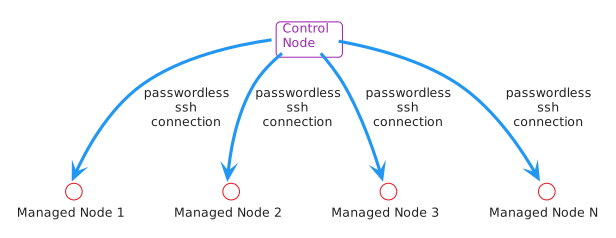
Application installations will be orchestrated from a single server that hosts
Ansible, i.e. the Control Node. -
There is no need to install an agent on any of the target servers, i.e. Managed Nodes.
-
Communication between the Control Node and the nix* Managed Nodes is accomplished passwordless via openssh.
Prerequisite Setup
The Control Node will communicate with each of the Managed Nodes via passwordless logins.
An SSH Key pair will need to be generated for each Managed Node.
-
Log on to the Control Node
-
Generate the ssh key via ssh-keygen
ssh-keygen -t ecdsa -b 521 -
View the newly created key with
ls ~/.ssh/id_*Example/home/<username>/.ssh/id_ecdsa /home/<username>/.ssh/id_ecdsa.pub -
Transfer the public SSH key to each server that Ansible will target i.e., Managed Nodes:
ssh-copy-id -f dhante@v-ubuntu-test1-
Once the user is authenticated, the public key ~/.ssh/id_rsa.pub will be appended to the remote user ~/.ssh/authorized_keys file, and the connection will be closed.
-
-
Test via:
ssh dhante@v-ubuntu-test1
Installation
Only Control Nodes require Ansible to be installed.
Ubuntu installation
-
Update the local package index
sudo apt update -
Install the software-properties package to manage repositories
sudo apt install -y software-properties-common -
Add the official Ansible PPA
sudo add-apt-repository --yes --update ppa:ansible/ansible -
Install
sudo apt install -y ansible -
Confirm
ansible --version
Ansible Vault
The Ansible Vault is where secrets should be stored.
-
Add this entry to the top level Playbook file
- hosts: ubuntu
  gather_facts: true
  vars_files: (1)
    - group_vars/ubuntu_vault.yml # Explicitly load the secrets (2)

  tasks:
    - name: Verify usable Python at host
      ansible.builtin.ping:

    - name: Include common role
      ansible.builtin.include_role:
        name: common
1 This is the new property to add 2 Vault file name -
Create file
touch group_vars/ubuntu_vault.yml -
Add some secrets now and will encrypt later.
Use this format:samba_password: "!secr3t" -
Now encrypt the Ansible Vault:
ansible-vault encrypt group_vars/ubuntu_vault.ymlYou will have to create a new vault password -
Now that the vault is encrypted, use the following to add/update/remove entries:
ansible-vault edit group_vars/ubuntu_vault.ymlYou will have to supply the vault’s password -
You can reference vault entries like this:
{{ samba_password }}
Run Playbook
-
Check with
-
List the hosts in the ubuntu group that are defined in the
hosts.ymlinventory file. Theinstall.ymlplaybook will target these hosts:ansible ubuntu -i hosts.yml --list-hosts -
Ping all hosts
ansible ubuntu -m ping -i hosts.yml -
Run the
install.ymlplaybook wih your inventory filehosts.yml:ansible-playbook -i hosts.yml install.yml --ask-become-pass --ask-vault-pass -f 10