Docker Image: Universal Automation Center (UAC) Agent
-
Orginal documentation for the UAC Agent docker image can be found here.
-
We will start a detached container based on the
UAC Agentimage with a friendly name of My-UAG1.-
But first, we’ll need to be aware of some values which will be passed to the container by defining environment variables within the
docker-compose.ymlfile:ENV Var Value Description UAGNETNAME
DockerUAG1
gives the agent a unique Agent ID within the UAC.
UAGOMSSERVERS
7878@v-serv2022-uac
list of one or more OMS server addresses.
UAGAGENTCLUSTERS
DockerAgentCluster
automatically add the agent into a predefined agent cluster.
UAGTRANSIENT
yes
mark the agent as transient so that it is automatically deleted from the UAC when the container is deleted.
UAGENABLESSL
yes
enable SSL.
-
create a
docker-compose.ymlfile with the following contentversion: '3' services: UAG: image: 'stonebranch/universal-agent:latest' container_name: My-UAG1 environment: - UAGNETNAME=DockerUAG1 - UAGOMSSERVERS=7878@v-serv2022-uac - UAGAGENTCLUSTERS=DockerAgentCluster - UAGTRANSIENT=yes - UAGENABLESSL=yes -
Start the container via the
docker-compose.ymlfile:This command must be executed within the directory containing the docker-compose.ymlfileCommanddocker compose up -dResults[+] Running 2/2 - Network "uac_default" Created 0.0s - Container uac_My-UAG1_1 Started 0.6s
-
view the running container:
This command must be executed within the directory containing the docker-compose.ymlfileCommanddocker compose psResultsNAME SERVICE STATUS PORTS uac_My-UAG1_1 My-UAG1 running 7878/tcp, 7887/tcp -
Now we can see the Agent in the
UACand it’s related Agent Cluster: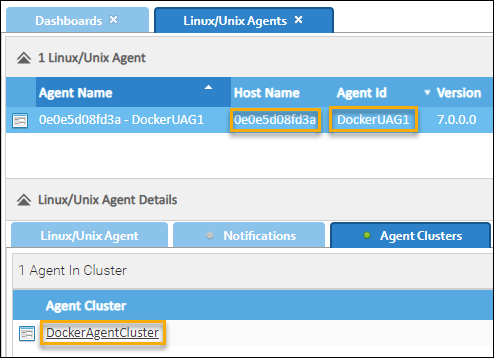
-
This agent can now run tasks within this container.
-